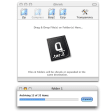
If you have to decompress files regularly, especially image files, you may find Zipeg interesting. It's definitely one of the nicest image decompressors I've used in a while and best of all, there's no registration or payment required.
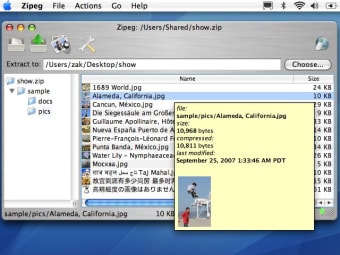
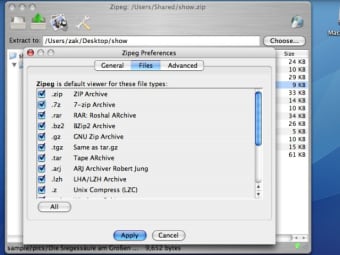
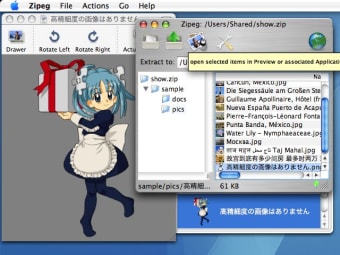
The key feature of this program is a cool preview function which allows you to see what you are going to decompress before you do it. This is great if you can't remember what's in a file or are suspicious about its contents. It supports a huge variety of archive formats including: ZIP, RAR, WINRAR, ARJ, LHA/LZH, 7z, TAR, GZ, TGZ, BZIP2, CPIO, RPM, ISO, CHM, Z, CBR, CBZ, WAR and EAR.
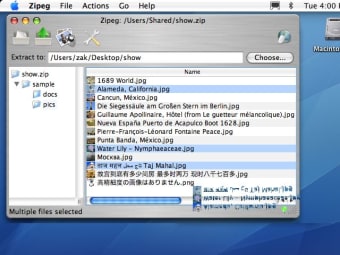
You can extract/unzip items simply by dragging them and the interface is remarkably easy to use and good looking. It can process archives in the background whilst you work, sorts content of folders by name, size or date and automatically checks for the latest updates.
This is one of the best image compression utilities available for Mac, although the thumbnails can take some time to appear when you select a file.
Mac ppc compatibility,
opening nested "matryoshka" style archives
java 1.5 compatibility issues
use volume local Trash Bin on file overwrite
better check for write permissions on destinations
optimized fix resource forks on mac
checked keyboard Caps Lock state in Password dialog
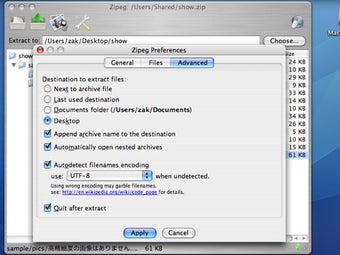
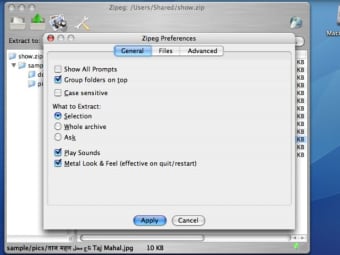
added new preferences
Zipeg is free utility for Mac OS X. Zipeg allows you to open and explore content of zip, rar and other archives, preview files and images before you extract/unzip them. Extract only the files you want. Zip thru photo archives. See image thumbnails. Zipeg allows you to decide what do you want to extract. You can choose what to extract and where to put extracted files or just drag and drop them.
The minimal command buttons allow you to open files, and extract and preview them. There is also an Options button that lets you select the file you would like the program to open by default, and also where to place the destination file. When Zipeg opens compressed archive, the file’s contents were displayed in the main window and the structure of the archive is displayed as a navigatable folder tree view in the left pane. Hovering the mouse over each individual file displayed the file’s size, including the compression size and the modification date. The preview option allowed us to view the entire file without having to extract it first. Zipeg keeps user in charge of the extraction process.
Zipeg is file decompression tool that offers the convenience of previewing an entire file before extracting it, and it does so free of charge. Zipeg for Windows and Macintosh has a very simple interface that will appeal to all users.
Power users that work with compressed files archives. Gaming community and everybody who downloads .zip and .rar archives from the Internet
Brutally Slow. I was trying to unzip a rar file that was 900MB uncompressed, only compressed to 800MB. I watched two TV episodes in the time it took to unsuccessfully decompress. It states that it was 99% done after about a minute. It managed to completely stall my computer and had to be closed using task manager. Seriously, use something else. I used Jzip and in the process of writing this review the files decompressed. Pros: N/A - first file I decompressed, and last... Cons: Slows computer to grinding halt, got my hopes up with 99% completion.
Anonymous user
This is Good. This is a great app it unzip's files very quickly but the menu that pops up to configure opening the zip is a bit confusing and fiddly. It is good though and would recommend for opening zip files as well as lots of other files.
Anonymous user
Seems very slow for me. I downloaded this software to be able to unzip a 7zip file created on windows machine. The 7zip was quite large (from 1.3GB to 600 MB where standard zip did 1GB) - mostly jpeg, pdf and eps files were contained in the zip. I dont know if it is zipegs problem (or 7zips) but uncompressing that file seems like neverending. It didnt finish after one hour! I guess it is ok software but probably not for so huge archives. Pros: supports many formats Cons: very slow. seems that it is not mac native, but a java software.
Laws concerning the use of this software vary from country to country. We do not encourage or condone the use of this program if it is in violation of these laws. Softonic may receive a referral fee if you click or buy any of the products featured here.